close
Font size options
Increase or decrease the font size for this website by clicking on the 'A's.
Contrast options
Choose a color combination to give the most comfortable contrast.
Image for event: Introduction to Microsoft Excel

Registration now closed

Introduction to Microsoft Excel

Learn how to create spreadsheets with Microsoft Excel Online, the free online version of Excel.

2025-03-17 17:30:00 2025-03-17 19:30:00 America/Indiana/Indianapolis Introduction to Microsoft Excel Join us for a three-part introduction to Excel Online. Level 1 (Layout, Navigation, and Files), Level 2 (Formula Basics and Formatting), and Level 3 (Working with Data - Filter and Sort). This virtual series will demonstrate all skills using Excel in a web browser. Eagle Branch -

Monday, March 17
5:30pm - 7:30pm

Add to Calendar 2025-03-17 17:30:00 2025-03-17 19:30:00 America/Indiana/Indianapolis Introduction to Microsoft Excel Join us for a three-part introduction to Excel Online. Level 1 (Layout, Navigation, and Files), Level 2 (Formula Basics and Formatting), and Level 3 (Working with Data - Filter and Sort). This virtual series will demonstrate all skills using Excel in a web browser. Eagle Branch -

Join us for a three-part introduction to Excel Online. Level 1 (Layout, Navigation, and Files), Level 2 (Formula Basics and Formatting), and Level 3 (Working with Data - Filter and Sort). This virtual series will demonstrate all skills using Excel in a web browser.

Join the Tech Learning Team Library for a three-part introduction to Microsoft Excel Online. You are encouraged to attend all three sessions but may choose to join us for any single session if you wish. This series will demonstrate all skills using Excel Online in Chrome Web Browser. 

You must be comfortable using a mouse (clicking, double-clicking, and right clicking with accuracy), typing with a keyboard, and navigating to websites to successfully complete these classes. Participants may also benefit from pre-requisite knowledge of OneDrive; You are encouraged to explore the free set of lessons one OneDrive linked here from GCFLearnFree.

Level 1 - Monday March 3, 5:30-7:30 PM
Layout, Navigation, and Files
Explore Microsoft Excel Online, the free online version of Excel, learn the basic terminology for Excel projects; and discover how to create, save, and collaborate in Excel files.

Level 2 - Monday March 10, 5:30-7:30 PM
Formula Basics and Formatting
Explore built-in functions to quickly perform calculations or analyze data. Discover tips for formatting workbooks to effectively display its contents. Understanding of Level 1 content is required for this session.

Level 3 - Monday March 17, 5:30-7:30 PM, 5:30-7:30 p.m.
Working with Data - Filter and Sort 
Discover the basics of how to use Excel to effectively display, sort, and analyze data.

Eagle Branch

Phone: 317-275-4340

Hours
Skip opening hours widget
Mon, Feb 09 10:00AM to 8:00PM
Tue, Feb 10 10:00AM to 8:00PM
Wed, Feb 11 10:00AM to 6:00PM
Thu, Feb 12 10:00AM to 6:00PM
Fri, Feb 13 10:00AM to 6:00PM
Sat, Feb 14 10:00AM to 5:00PM
Sun, Feb 15 1:00PM to 5:00PM

About the branch

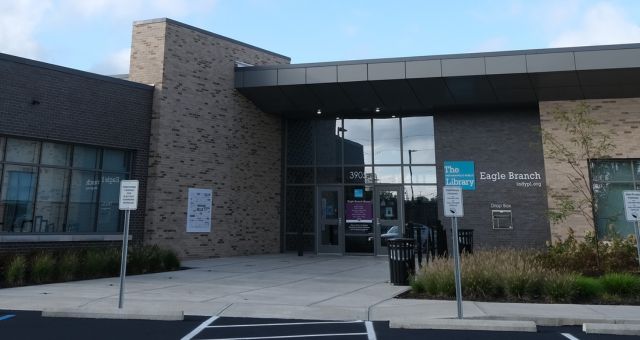
In 1960, after residents petitioned for a permanent library, a storefront branch opened at 30th Street and Lafayette Road, the first branch in the system to be located in a shopping center. A stand-alone facility at 3325 Lowry Road opened in 1970 with 12,000 square feet. On June 1, 2019 the Lowry Road facility was replaced by a new 20,000-square-foot building at 3905 Moller Road.

Upcoming events

Skip Branch Events widget
Tue, Feb 17, 10:30am - 11:15am

Tue, Feb 17, 4:30pm - 6:00pm

Wed, Feb 18, 10:30am - 11:00am

Tue, Feb 24, 4:30pm - 6:00pm

Cancelled
Tue, Feb 24, 7:00pm - 8:00pm

Cancelled
Wed, Feb 25, 10:30am - 11:00am

Thu, Feb 26, 3:30pm - 5:00pm

Sat, Feb 28, 11:00am - 1:00pm

Tue, Mar 03, 4:30pm - 6:00pm

Wed, Mar 04, 10:30am - 11:00am

Sat, Mar 07, 10:30am - 11:30am

Mon, Mar 09, 4:00pm - 6:00pm

Tue, Mar 10, 4:30pm - 6:00pm

Wed, Mar 11, 10:30am - 11:00am

Wed, Mar 11, 2:00pm - 4:00pm