Font size options
Increase or decrease the font size for this website by clicking on the 'A's.
Contrast options
Choose a color combination to give the most comfortable contrast.
Image for event: Introduction to Microsoft PowerPoint

Introduction to Microsoft PowerPoint

Learn how to create presentations with Microsoft PowerPoint Online, the free online version of PowerPoint.

2023-03-30 10:30:00 2023-03-30 12:30:00 America/Indiana/Indianapolis Introduction to Microsoft PowerPoint Join us for a three-part introduction to PowerPoint Online. Level 1 - Layout, Navigation, and Files Level 2 - Text, Images, and Customizing Slides Level 3 - Adding Animations and Multimedia This series will demonstrate all skills using PowerPoint in a web browser on Windows 10. Central Library -

Thursday, March 30
10:30am - 12:30pm

Add to Calendar 2023-03-30 10:30:00 2023-03-30 12:30:00 America/Indiana/Indianapolis Introduction to Microsoft PowerPoint Join us for a three-part introduction to PowerPoint Online. Level 1 - Layout, Navigation, and Files Level 2 - Text, Images, and Customizing Slides Level 3 - Adding Animations and Multimedia This series will demonstrate all skills using PowerPoint in a web browser on Windows 10. Central Library -

Join us for a three-part introduction to PowerPoint Online. Level 1 - Layout, Navigation, and Files Level 2 - Text, Images, and Customizing Slides Level 3 - Adding Animations and Multimedia This series will demonstrate all skills using PowerPoint in a web browser on Windows 10.

Don't forget about this program - click here to sign up for reminders about this series.

Join the Tech Learning Team afor a three-part introduction to Microsoft Excel Online. You are encouraged to attend all three sessions but may choose to join us for any single session if you wish. This series will demonstrate all skills using Excel Online in Chrome Web Browser on a Windows 10 computer. 

You must be comfortable using a mouse (clicking, double-clicking, and right clicking with accuracy), typing with a keyboard, and navigating to websites to successfully complete these classes. Participants may also benefit from pre-requisite knowledge of OneDrive; You are encouraged to explore the free set of lessons one OneDrive linked here from GCFLearnFree.

Level 1 - Thursday, March 16, 10:30AM-12:30PM
Layout, Navigation, and Files
Explore PowerPoint Online, learn the basic terminology for PowerPoint presentations, and discover how to create and save PowerPoint files.

Level 2 - Thursday, March 23, 10:30AM-12:30PM
Text, Images, and Customizing Slides
Explore how to build presentation content by adding elements such as text, images, and transitions to a slide.

Level 3 - Thursday, March 30, 10:30AM-12:30PM
Adding Animations and Multimedia
Prepare for presenting in front of an audience by applying visually interesting animations, adding multimedia content, and selecting the best presentation options for your needs.

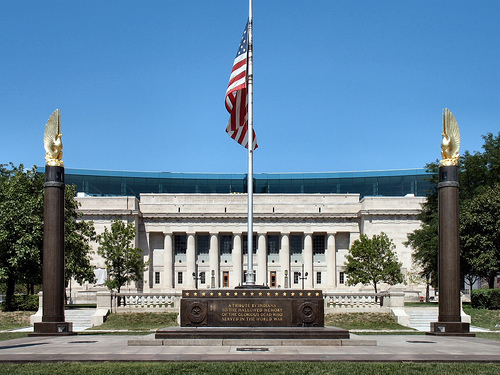
Central Library

Phone: 317-275-4100

Hours
Skip opening hours widget
Mon, May 04 10:00AM to 8:00PM
Tue, May 05 10:00AM to 8:00PM
Wed, May 06 10:00AM to 6:00PM
Thu, May 07 10:00AM to 6:00PM
Fri, May 08 10:00AM to 5:00PM
Sat, May 09 10:00AM to 5:00PM
Sun, May 10 1:00PM to 5:00PM

About the branch

As the hub of the Indianapolis Public Library system, Central Library showcases renowned architecture and services. The original 1917 building, designed by Paul Cret and constructed of Indiana limestone in the Greek Doric style, was considered one of the most outstanding secular buildings in the U.S. Its six-story glass and steel-framed addition, designed by Evans Woollen, opened in 2007.

Upcoming events

Skip Branch Events widget
Sun, May 10, 1:00pm - 3:00pm

Sun, May 10, 1:00pm - 3:00pm

Sun, May 10, 1:00pm - 4:00pm

Mon, May 11, 10:00am - 12:00pm

Mon, May 11, 5:30pm - 7:30pm

Mon, May 11, 6:00pm - 8:00pm

Tue, May 12, 5:00pm - 7:00pm

Tue, May 12, 5:30pm - 7:30pm

Tue, May 12, 5:30pm - 7:30pm
This event is full

Tue, May 12, 6:00pm - 7:00pm

Tue, May 12, 6:00pm - 7:30pm

Wed, May 13, 3:00pm - 5:00pm

Thu, May 14, 4:00pm - 5:00pm

Fri, May 15, 11:00am - 12:00pm

Sat, May 16, 10:00am - 11:00am

Sat, May 16, 1:00pm - 4:00pm

Sat, May 16, 2:00pm - 4:00pm
This event is full

Sat, May 16, 2:30pm - 4:30pm
This event is full

Sun, May 17, 1:00pm - 4:00pm

Mon, May 18, 10:00am - 12:00pm

Mon, May 18, 11:00am - 12:00pm

Mon, May 18, 5:30pm - 7:30pm

Tue, May 19, 5:00pm - 7:00pm

Tue, May 19, 5:30pm - 7:30pm

Tue, May 19, 5:30pm - 7:30pm

Tue, May 19, 6:00pm - 8:00pm

Tue, May 19, 6:00pm - 7:00pm
This event is full

Wed, May 20, 3:00pm - 5:00pm

Thu, May 21, 4:00pm - 5:00pm

Fri, May 22, 11:00am - 11:45am

Tue, May 26, 5:00pm - 7:00pm

Tue, May 26, 5:30pm - 7:30pm

Tue, May 26, 5:30pm - 7:30pm

Tue, May 26, 5:30pm - 7:30pm

Tue, May 26, 6:00pm - 8:00pm

Tue, May 26, 6:00pm - 7:00pm
This event is full

Cancelled
Wed, May 27, 2:00pm - 4:00pm

Wed, May 27, 3:00pm - 5:00pm

Thu, May 28, 4:00pm - 5:00pm

Fri, May 29, 11:00am - 12:00pm

Fri, May 29, 2:00pm - 2:45pm
Registration opens Friday, May 15 2026 at 2:00pm

Sat, May 30, 10:00am - 11:00am

Sat, May 30, 10:30am - 12:30pm
Makerspace

Sat, May 30, 1:00pm - 4:00pm

Sun, May 31, 1:00pm - 4:00pm

Sun, May 31, 2:00pm - 3:30pm

Mon, Jun 01, 5:30pm - 7:30pm

Tue, Jun 02, 5:30pm - 7:30pm

Tue, Jun 02, 6:00pm - 7:30pm

Tue, Jun 02, 6:00pm - 7:00pm
This event is full

Thu, Jun 04, 1:00pm - 3:00pm

Thu, Jun 04, 1:00pm - 2:00pm
Registration opens Thursday, May 21 2026 at 1:00pm

Thu, Jun 04, 4:00pm - 5:00pm

Fri, Jun 05, 10:00am - 12:00pm

Fri, Jun 05, 1:00pm - 3:00pm

Sat, Jun 06, 10:30am - 12:30pm
Makerspace

Sat, Jun 06, 2:30pm - 4:00pm
This event is full

Rescheduled
Sun, Jun 07, 2:00pm - 3:30pm
New date Sunday, October 18, 2:00pm - 3:30pm

Sun, Jun 07, 3:00pm - 4:30pm

Mon, Jun 08, 2:00pm - 4:00pm

Mon, Jun 08, 5:30pm - 7:30pm

Tue, Jun 09, 2:00pm - 4:00pm

Tue, Jun 09, 6:00pm - 7:30pm

Tue, Jun 09, 6:00pm - 7:00pm
This event is full