close
Font size options
Increase or decrease the font size for this website by clicking on the 'A's.
Contrast options
Choose a color combination to give the most comfortable contrast.
Image for event: Computer Basics Series - Level 1

Registration now closed

Computer Basics Series - Level 1

Mouse Basics and Parts of a Computer

2025-02-10 10:30:00 2025-02-10 12:30:00 America/Indiana/Indianapolis Computer Basics Series - Level 1 Adults with little or no experience in using a computer are invited to learn the parts of the computer and to use the computer mouse more effectively, a needed skill to use a computer and the Internet. Discover how to use a mouse and the on-screen cursor to make the computer do what you want it to. Central Library -

Monday, February 10
10:30am - 12:30pm

Add to Calendar 2025-02-10 10:30:00 2025-02-10 12:30:00 America/Indiana/Indianapolis Computer Basics Series - Level 1 Adults with little or no experience in using a computer are invited to learn the parts of the computer and to use the computer mouse more effectively, a needed skill to use a computer and the Internet. Discover how to use a mouse and the on-screen cursor to make the computer do what you want it to. Central Library -

Adults with little or no experience in using a computer are invited to learn the parts of the computer and to use the computer mouse more effectively, a needed skill to use a computer and the Internet. Discover how to use a mouse and the on-screen cursor to make the computer do what you want it to.

Join the Tech Learning Team for a three-part series introduction to using a Windows 10 computer. You are encouraged to attend all three sessions but may choose to join us for any single session if you wish. 

Level 1 - Monday, February 10, 10:30 a.m. -12:30 p.m. 
Mouse Basics and Parts of a Computer
Adults with little or no experience in using a computer are invited to learn the parts of the computer and to use the computer mouse more effectively, a needed skill to use a computer and the Internet. By the end of this class, you should be able to recognize the major parts of a personal computer and use a mouse and the on-screen cursor to make the computer do what you want it to.

Level 2 - Monday, February 17, 10:30 a.m. -12:30 p.m. 
Improve Your Typing and Computer Navigation
Adults with basic mouse skills are invited to practice keyboard skills to type more effectively. By the end of this class, you should be able to identify the keys on a keyboard and their functions, use a hotkey combination, and identify basic landmarks on a Windows 10 computer such as icons and taskbars.

Level 3 - Monday, February 24, 10:30 a.m. -12:30 p.m. 
Files, Flashdrives, and Beyond
Adults with basic mouse and typing skills are invited to learn how to apply those skills to create files and store them on a flashdrive. By the end of this class you should be able to use a flashdrive to store and open files, organize files into folders, and identify ways to connect peripheral devices to a Windows 10 computer with common ports.

Made possible by G. Marlyne Sexton, Honda and Lacy Foundation through gifts to The Indianapolis Public Library Foundation.

Central Library

Phone: 317-275-4100

Hours
Skip opening hours widget
Mon, Mar 09 Closed
(interior repair)
Tue, Mar 10 Closed
(interior repair)
Wed, Mar 11 Closed
(interior repair)
Thu, Mar 12 Closed
(interior repair)
Fri, Mar 13 Closed
(interior repair)
Sat, Mar 14 Closed
(interior repair)
Sun, Mar 15 Closed
(interior repair)

About the branch

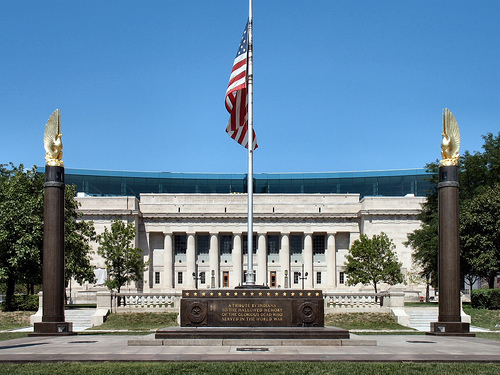
As the hub of the Indianapolis Public Library system, Central Library showcases renowned architecture and services. The original 1917 building, designed by Paul Cret and constructed of Indiana limestone in the Greek Doric style, was considered one of the most outstanding secular buildings in the U.S. Its six-story glass and steel-framed addition, designed by Evans Woollen, opened in 2007.

Upcoming events

Skip Branch Events widget
Cancelled
Sun, Mar 15, 1:00pm - 4:00pm

Cancelled
Mon, Mar 16, 1:00pm - 3:00pm

Mon, Mar 16, 2:00pm - 4:00pm
This event is full

Cancelled
Mon, Mar 16, 5:30pm - 7:30pm

Mon, Mar 16, 5:30pm - 7:30pm
This event is full

Cancelled
Mon, Mar 16, 5:30pm - 8:00pm

Cancelled
Tue, Mar 17, 1:00pm - 3:00pm

Cancelled
Tue, Mar 17, 2:00pm - 4:00pm

Cancelled
Tue, Mar 17, 5:00pm - 7:00pm

Cancelled
Tue, Mar 17, 5:30pm - 7:30pm

Cancelled
Tue, Mar 17, 6:00pm - 8:00pm

Cancelled
Wed, Mar 18, 1:00pm - 3:00pm

Cancelled
Wed, Mar 18, 3:00pm - 5:00pm

Cancelled
Thu, Mar 19, 1:00pm - 3:00pm

Cancelled
Fri, Mar 20, 11:00am - 11:30am

Cancelled
Sat, Mar 21, 10:00am - 11:00am

Cancelled
Sat, Mar 21, 1:00pm - 4:00pm

Cancelled
Sat, Mar 21, 2:30pm - 4:30pm

Cancelled
Sun, Mar 22, 1:00pm - 4:00pm

Mon, Mar 23, 2:00pm - 4:00pm
This event is full

Cancelled
Mon, Mar 23, 5:30pm - 7:30pm

Mon, Mar 23, 5:30pm - 7:30pm
This event is full

Cancelled
Mon, Mar 23, 5:30pm - 8:00pm

Cancelled
Tue, Mar 24, 2:00pm - 4:00pm

Cancelled
Tue, Mar 24, 5:00pm - 7:00pm

Cancelled
Tue, Mar 24, 5:30pm - 7:30pm

Cancelled
Tue, Mar 24, 5:30pm - 7:30pm

Tue, Mar 24, 6:00pm - 8:00pm

Cancelled
Wed, Mar 25, 3:00pm - 5:00pm

Cancelled
Fri, Mar 27, 11:00am - 11:45am

Fri, Mar 27, 2:00pm - 4:00pm
This event is full

Cancelled
Sat, Mar 28, All day

Sat, Mar 28, 10:00am - 11:00am

Sat, Mar 28, 1:00pm - 4:00pm

Sun, Mar 29, 1:00pm - 4:00pm

Mon, Mar 30, 5:30pm - 7:30pm

Tue, Mar 31, 2:00pm - 4:00pm

Tue, Mar 31, 5:00pm - 7:00pm

Tue, Mar 31, 5:30pm - 7:30pm

Sat, Apr 04, 11:00am - 4:00pm

Mon, Apr 06, 10:30am - 12:30pm

Tue, Apr 07, 6:00pm - 7:30pm

Tue, Apr 07, 6:00pm - 7:00pm

Fri, Apr 10, 11:00am - 11:45am

Mon, Apr 13, 10:30am - 12:30pm

Tue, Apr 14, 2:00pm - 4:00pm
This event is full

Tue, Apr 14, 6:00pm - 7:00pm

Tue, Apr 14, 6:00pm - 7:30pm

Tue, Apr 14, 6:00pm - 7:30pm

Tue, Apr 14, 6:00pm - 7:00pm