close
Font size options
Increase or decrease the font size for this website by clicking on the 'A's.
Contrast options
Choose a color combination to give the most comfortable contrast.
Image for event: Adobe Creative Cloud Self-Study: Photoshop, Audition, InDesign and More

Adobe Creative Cloud Self-Study: Photoshop, Audition, InDesign and More

Learn. Design. Create

2024-06-22 15:30:00 2024-06-22 17:00:00 America/Indiana/Indianapolis Adobe Creative Cloud Self-Study: Photoshop, Audition, InDesign and More Learn about Adobe Creative Cloud or work on a project with the library's training computers. Use Adobe's beginner tutorials or access video tutorials from LinkedIn Learning with your library card. See description for how to prepare for this session and available Adobe Software on training computers. Central Library -

Saturday, June 22
3:30pm - 5:00pm

Add to Calendar 2024-06-22 15:30:00 2024-06-22 17:00:00 America/Indiana/Indianapolis Adobe Creative Cloud Self-Study: Photoshop, Audition, InDesign and More Learn about Adobe Creative Cloud or work on a project with the library's training computers. Use Adobe's beginner tutorials or access video tutorials from LinkedIn Learning with your library card. See description for how to prepare for this session and available Adobe Software on training computers. Central Library -

Learn about Adobe Creative Cloud or work on a project with the library's training computers. Use Adobe's beginner tutorials or access video tutorials from LinkedIn Learning with your library card. See description for how to prepare for this session and available Adobe Software on training computers.

This session is not a class; staff will be on hand to help you log-in to Adobe Creative Cloud and to recommend self-directed tutorials to meet your learning goals, they are not trained on all Adobe Creative Cloud platforms so are unable to assist with projects.

How to prepare for this session:

  1. Create an Adobe ID. To access the Adobe Creative Cloud you will need an Adobe ID. Create a free account at https://account.adobe.com. You will need access to the phone number or email associated with your Adobe ID account during this session to complete a Two-Factor Authentication process.
  2. Bring Headphones. Headphones are required for the video or narrated tutorials. You may bring your own or purchase a pair for $2 from the library. 
  3. Bring Your Library Card. A library card is required to access LinkedIn Learning tutorials. Find out how to get one here.
  4. Bring a USB Flashdrive. Your free Adobe account comes with limited free cloud storage. For most projects, you will need a USB Flashdrive in order to save your project for future access. We recommend bringing a larger capacity flashdrive if you are working on multimedia projects. 

Available Adobe Apps:

The library's training computers allows access to the Adobe Creative Cloud but the computers are configured for training and may not be able to support large projects, such as video or large audio files. Adobe Creative Cloud includes the following apps: 

  • Photoshop
  • Illustrator
  • Acrobat Pro
  • Premiere Pro
  • After Effects
  • InDesign
  • Adobe Express
  • Audition
  • Animate

Central Library

Phone: 317-275-4100

Hours
Skip opening hours widget
Mon, Mar 09 Closed
(interior repair)
Tue, Mar 10 Closed
(interior repair)
Wed, Mar 11 Closed
(interior repair)
Thu, Mar 12 Closed
(interior repair)
Fri, Mar 13 Closed
(interior repair)
Sat, Mar 14 Closed
(interior repair)
Sun, Mar 15 Closed
(interior repair)

About the branch

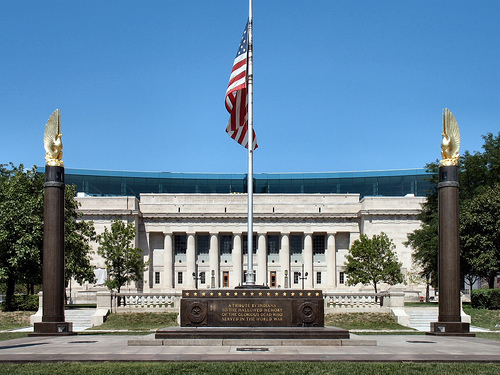
As the hub of the Indianapolis Public Library system, Central Library showcases renowned architecture and services. The original 1917 building, designed by Paul Cret and constructed of Indiana limestone in the Greek Doric style, was considered one of the most outstanding secular buildings in the U.S. Its six-story glass and steel-framed addition, designed by Evans Woollen, opened in 2007.

Upcoming events

Skip Branch Events widget
Mon, Mar 09, 4:00pm - 6:00pm
Registration is now closed

Mon, Mar 09, 5:30pm - 7:30pm

Tue, Mar 10, 2:00pm - 4:00pm

Tue, Mar 10, 5:00pm - 7:00pm

Tue, Mar 10, 5:30pm - 7:30pm

Tue, Mar 10, 6:00pm - 7:30pm

Wed, Mar 11, 3:00pm - 5:00pm

Cancelled
Thu, Mar 12, 4:30pm - 5:30pm

Fri, Mar 13, 11:00am - 12:00pm

Sat, Mar 14, 10:00am - 11:00am

Sat, Mar 14, 1:00pm - 4:00pm

Sun, Mar 15, 1:00pm - 4:00pm

Mon, Mar 16, 1:00pm - 3:00pm

Mon, Mar 16, 2:00pm - 4:00pm
This event is full

Mon, Mar 16, 5:30pm - 7:30pm
This event is full

Mon, Mar 16, 5:30pm - 7:30pm

Tue, Mar 17, 1:00pm - 3:00pm

Tue, Mar 17, 2:00pm - 4:00pm

Tue, Mar 17, 5:00pm - 7:00pm

Tue, Mar 17, 5:30pm - 7:30pm

Tue, Mar 17, 6:00pm - 8:00pm

Wed, Mar 18, 1:00pm - 3:00pm

Wed, Mar 18, 3:00pm - 5:00pm

Thu, Mar 19, 1:00pm - 3:00pm

Fri, Mar 20, 11:00am - 11:30am
This event is full

Sat, Mar 21, 10:00am - 11:00am

Sat, Mar 21, 1:00pm - 4:00pm

Sat, Mar 21, 2:30pm - 4:30pm
This event is full

Sun, Mar 22, 1:00pm - 4:00pm

Mon, Mar 23, 2:00pm - 4:00pm
This event is full

Mon, Mar 23, 5:30pm - 7:30pm

Mon, Mar 23, 5:30pm - 7:30pm
This event is full

Tue, Mar 24, 2:00pm - 4:00pm

Tue, Mar 24, 5:00pm - 7:00pm

Tue, Mar 24, 5:30pm - 7:30pm

Tue, Mar 24, 5:30pm - 7:30pm

Tue, Mar 24, 6:00pm - 8:00pm

Wed, Mar 25, 3:00pm - 5:00pm

Fri, Mar 27, 11:00am - 11:45am

Fri, Mar 27, 2:00pm - 4:00pm
This event is full

Sat, Mar 28, 10:00am - 11:00am

Sat, Mar 28, 1:00pm - 4:00pm

Sun, Mar 29, 1:00pm - 4:00pm

Mon, Mar 30, 5:30pm - 7:30pm

Tue, Mar 31, 2:00pm - 4:00pm

Tue, Mar 31, 5:00pm - 7:00pm

Tue, Mar 31, 5:30pm - 7:30pm

Sat, Apr 04, 11:00am - 4:00pm

Mon, Apr 06, 10:30am - 12:30pm

Tue, Apr 07, 6:00pm - 7:00pm

Tue, Apr 07, 6:00pm - 7:30pm